Eino ADK: Agent Collaboration
Agent Collaboration
The overview document has provided basic explanations for Agent collaboration. Below, we will introduce the design and implementation of collaboration and composition primitives with code:
-
Collaboration Primitives
- Agent Collaboration Modes
Mode Description Transfer Directly transfer the task to another Agent. The current Agent exits after execution and does not care about the task execution status of the transferred Agent ToolCall (AgentAsTool) Treat an Agent as a ToolCall, wait for the Agent's response, and obtain the output result of the called Agent for the next round of processing - AgentInput Context Strategies
Context Strategy Description Upstream Agent Full Dialogue Get the complete conversation history of the upstream Agent New Task Description Ignore the complete conversation history of the upstream Agent and provide a new task summary as the AgentInput for the sub-Agent - Decision Autonomy
Decision Autonomy Description Autonomous Decision Within the Agent, based on its available downstream Agents, autonomously select a downstream Agent for assistance when needed. Generally, the Agent makes decisions based on LLM internally, but even if selection is based on preset logic, it is still considered autonomous decision from the Agent's external perspective Preset Decision Pre-set the next Agent after an Agent executes a task. The execution order of Agents is predetermined and predictable -
Composition Primitives
Type Description Running Mode Collaboration Mode Context Strategy Decision Autonomy SubAgents Combine the user-provided agent as the parent Agent and the user-provided subAgents list as child Agents to form an Agent capable of autonomous decision-making, where Name and Description serve as the Agent's name identifier and description. - Currently limited to one Agent having only one parent Agent
- Use the SetSubAgents function to build a "multi-branch tree" form of Multi-Agent
- In this "multi-branch tree", AgentName must remain unique
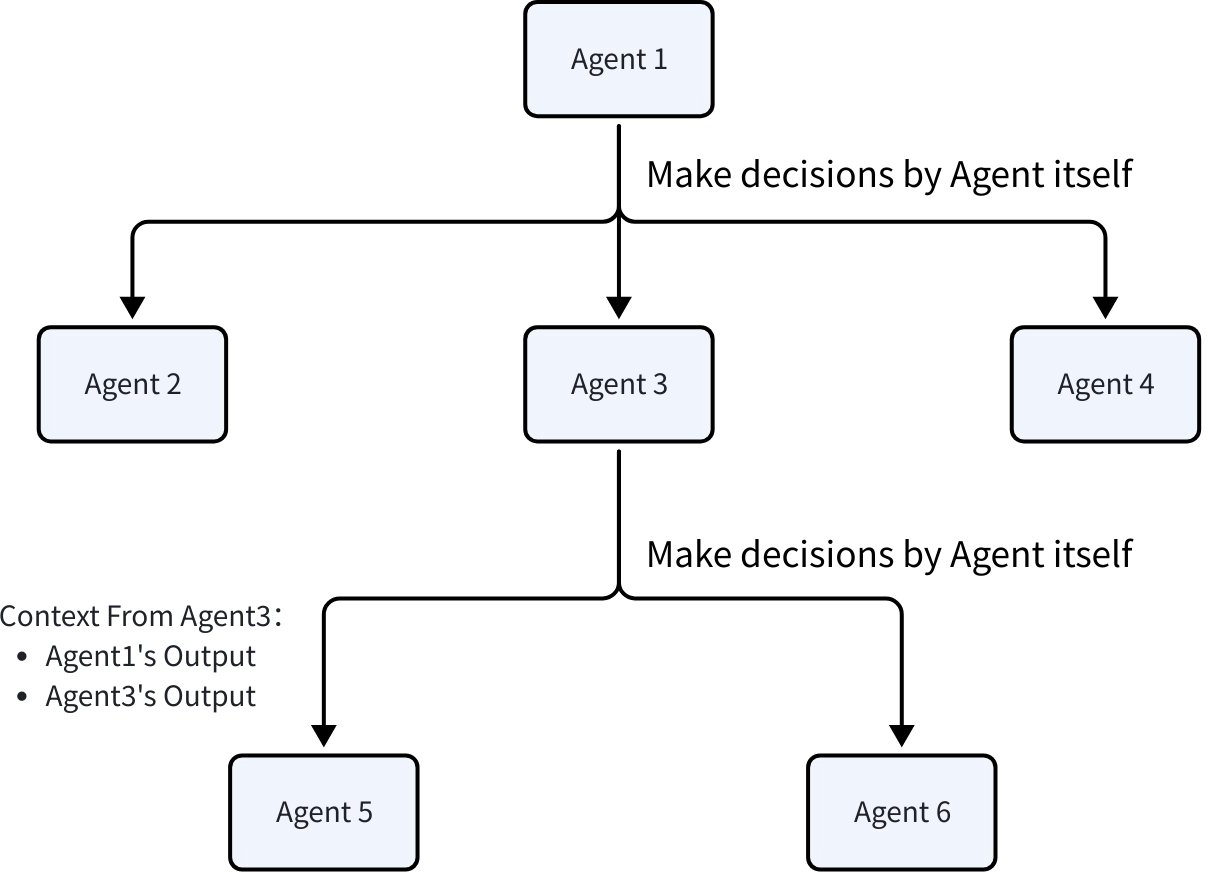
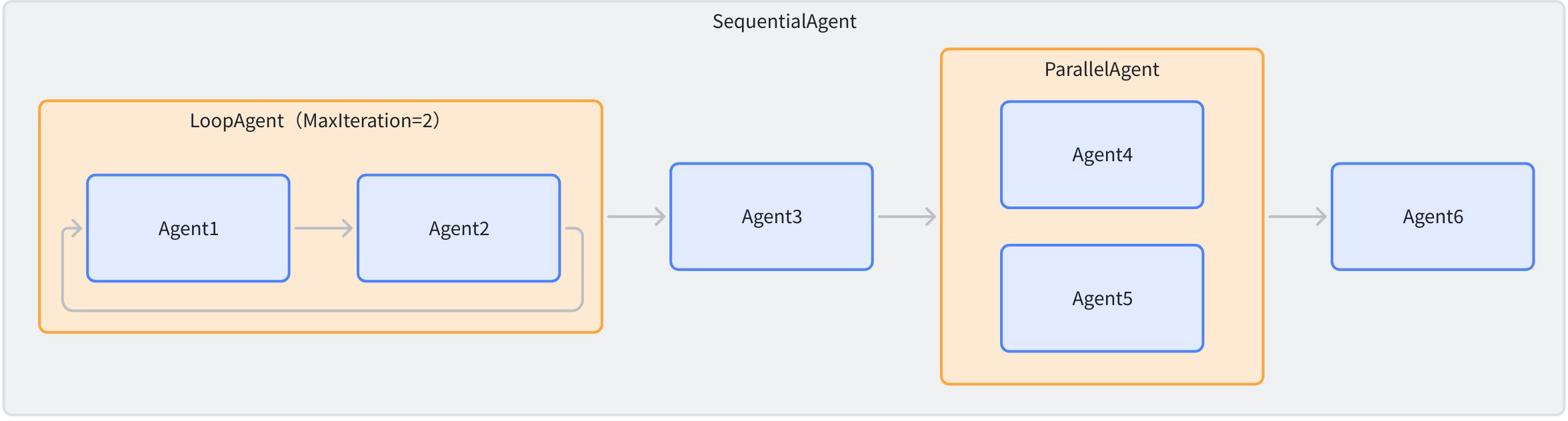
Transfer Upstream Agent Full Dialogue Autonomous Decision Sequential Combine the user-provided SubAgents list into a Sequential Agent that executes in order, where Name and Description serve as the Sequential Agent's name identifier and description. When the Sequential Agent executes, it runs the SubAgents list in order until all Agents have been executed once. 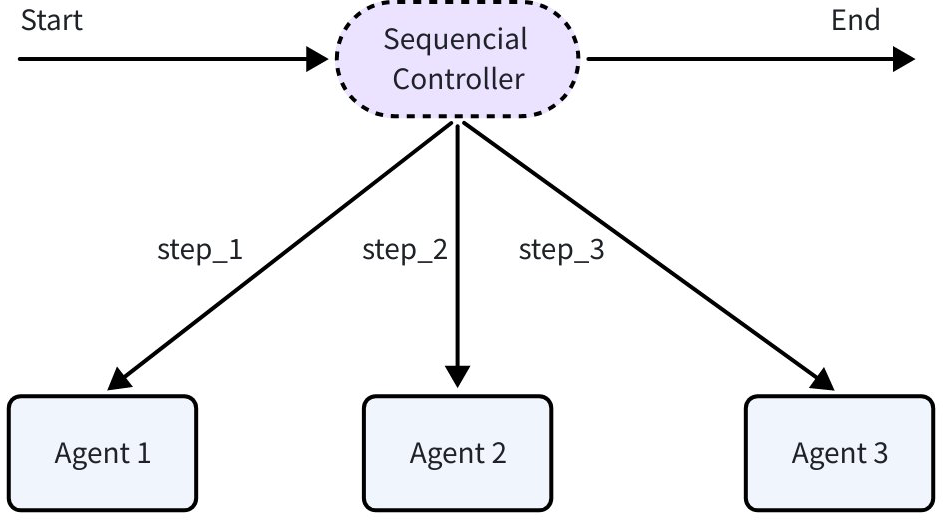
Transfer Upstream Agent Full Dialogue Preset Decision Parallel Combine the user-provided SubAgents list into a Parallel Agent that executes concurrently based on the same context, where Name and Description serve as the Parallel Agent's name identifier and description. When the Parallel Agent executes, it runs the SubAgents list concurrently and finishes after all Agents complete execution. 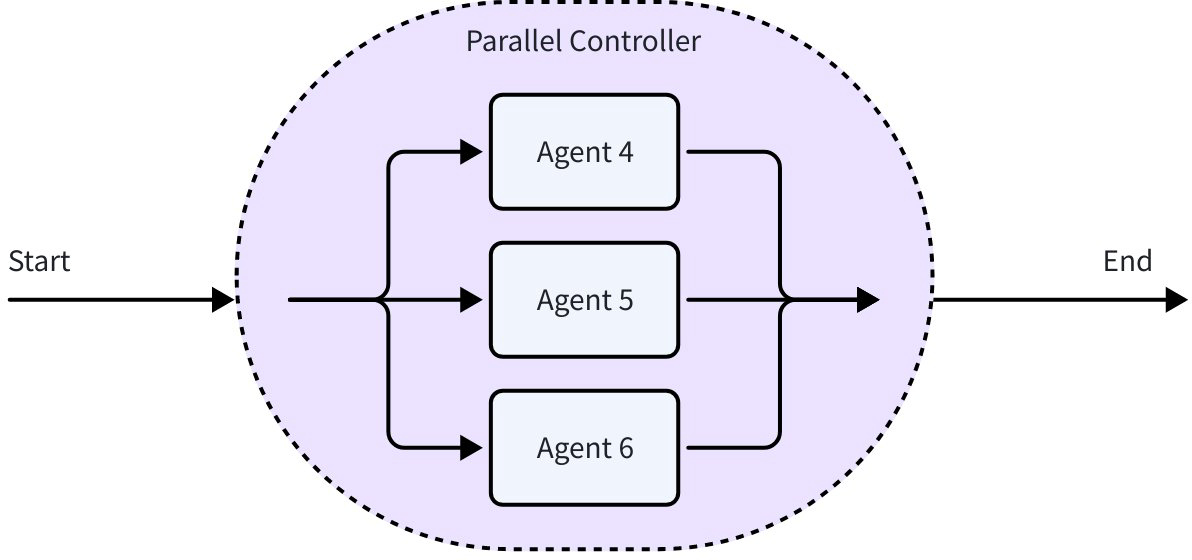
Transfer Upstream Agent Full Dialogue Preset Decision Loop Execute the user-provided SubAgents list in array order, cycling repeatedly, to form a Loop Agent, where Name and Description serve as the Loop Agent's name identifier and description. When the Loop Agent executes, it runs the SubAgents list in order and finishes after all Agents complete execution. 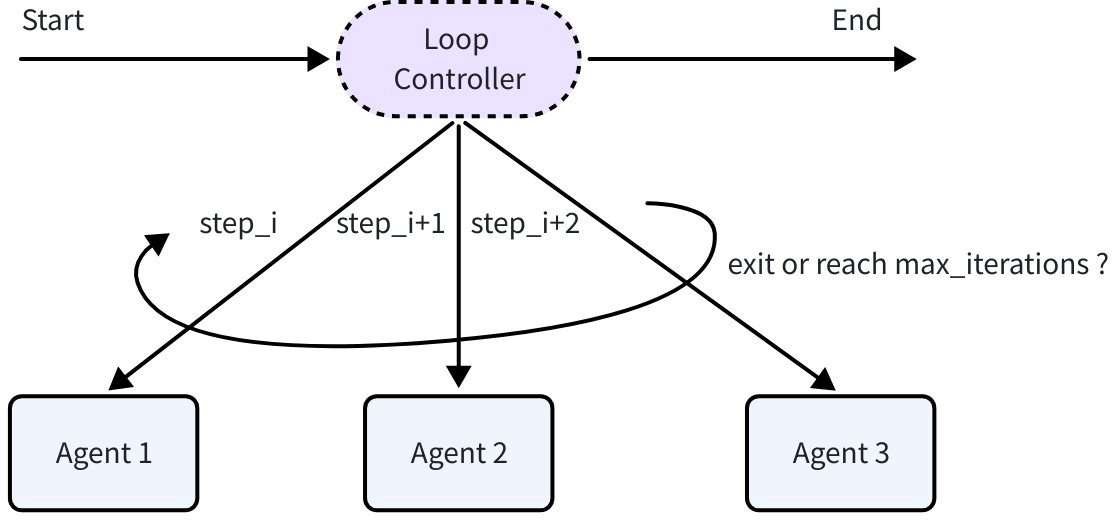
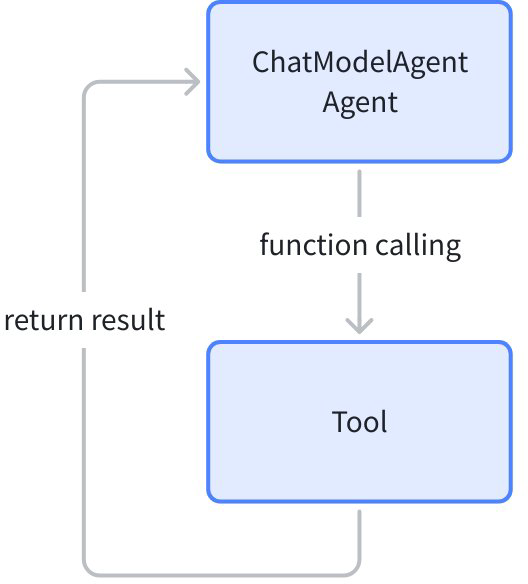
Transfer Upstream Agent Full Dialogue Preset Decision AgentAsTool Convert an Agent into a Tool to be used as a regular Tool by other Agents. Whether an Agent can call other Agents as Tools depends on its own implementation. The ChatModelAgent provided in adk supports the AgentAsTool functionality 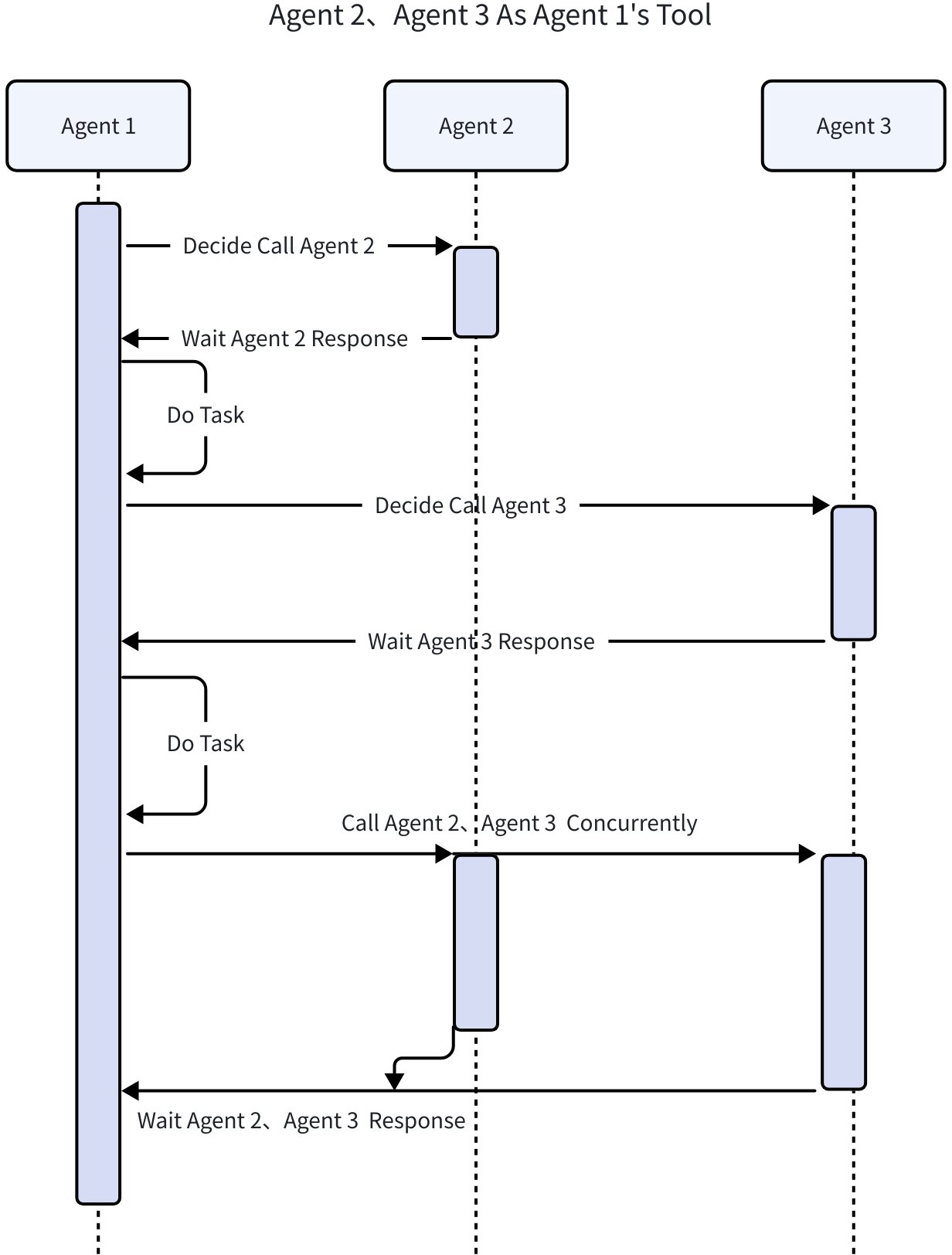
ToolCall New Task Description Autonomous Decision
Context Passing
When building multi-Agent systems, efficient and accurate information sharing between different Agents is crucial. Eino ADK provides two core context passing mechanisms to meet different collaboration needs: History and SessionValues.
History
Concept
History corresponds to the [Upstream Agent Full Dialogue Context Strategy]. Every AgentEvent produced by each Agent in a multi-Agent system is saved to History. When calling a new Agent (Workflow/Transfer), the AgentEvents in History are converted and appended to the AgentInput.
By default, Assistant or Tool Messages from other Agents are converted to User Messages. This is equivalent to telling the current LLM: “Just now, Agent_A called some_tool and returned some_result. Now it’s your turn to decide.”
Through this approach, other Agents’ behaviors are treated as “external information” or “factual statements” provided to the current Agent, rather than its own behaviors, thus avoiding LLM context confusion.
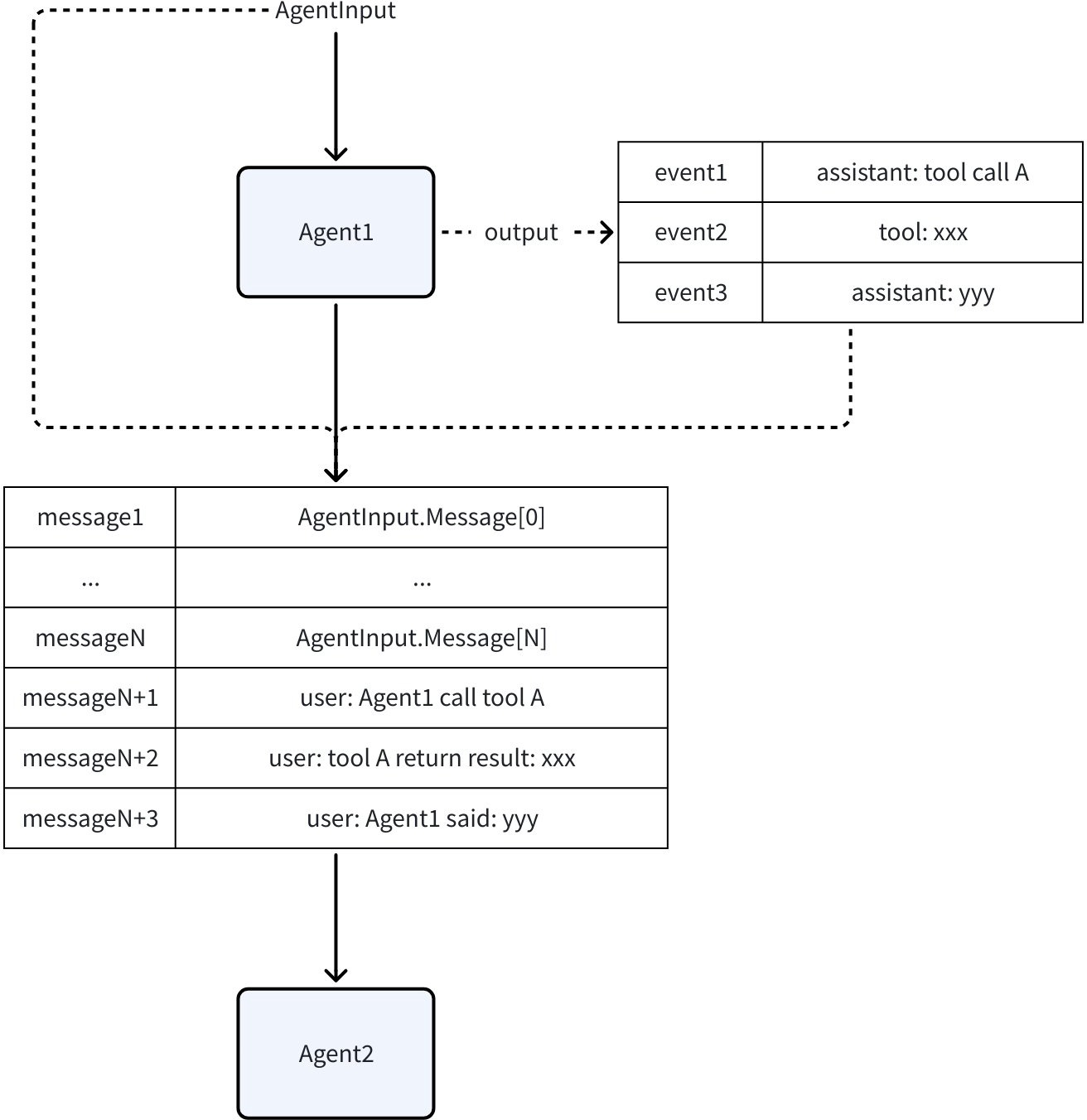
In Eino ADK, when building AgentInput for an Agent, the History it can see is “all AgentEvents produced before me.”
It’s worth mentioning ParallelWorkflowAgent: two parallel sub-Agents (A, B) cannot see each other’s AgentEvents during parallel execution, because neither parallel A nor B comes before the other.
RunPath
Each AgentEvent in History is “produced by a specific Agent in a specific execution sequence”, meaning AgentEvent has its own RunPath. The purpose of RunPath is to convey this information; it does not carry other functions in the eino framework.
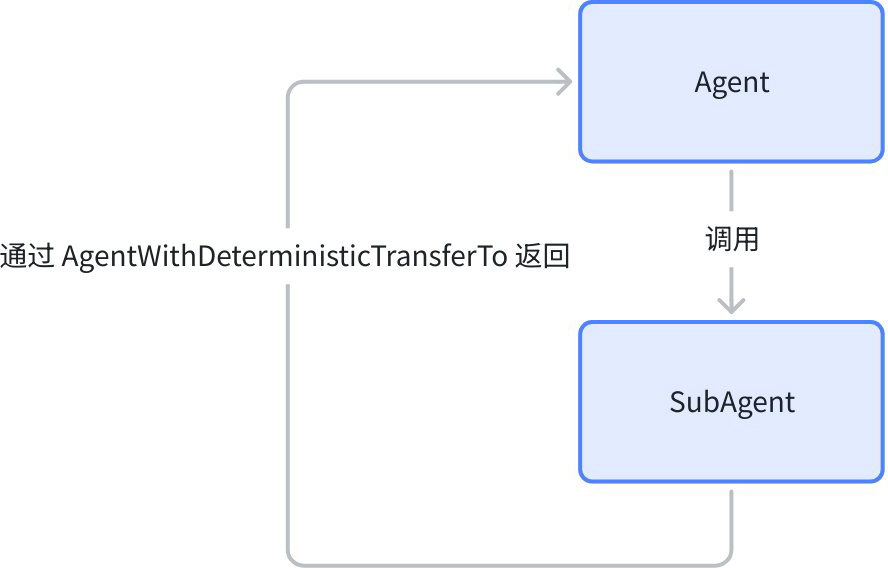
The table below shows the specific RunPath for Agent execution in various orchestration modes:
| Example | RunPath |
 | |
 | |
 | |
 |
Customization
In some cases, the History content needs to be adjusted before Agent execution. At this time, you can use AgentWithOptions to customize how the Agent generates AgentInput from History:
// github.com/cloudwego/eino/adk/flow.go

type HistoryRewriter func(ctx context.Context, entries []*HistoryEntry) ([]Message, error)

func WithHistoryRewriter(h HistoryRewriter) AgentOption
SessionValues
Concept
SessionValues is a global temporary KV storage that persists throughout a single run, used to support cross-Agent state management and data sharing. Any Agent in a single run can read and write SessionValues at any time.
Eino ADK provides multiple methods for concurrent-safe reading and writing of Session Values during Agent runtime:
// github.com/cloudwego/eino/adk/runctx.go

// Get all SessionValues
func GetSessionValues(ctx context.Context) map[string]any
// Batch set SessionValues
func AddSessionValues(ctx context.Context, kvs map[string]any)
// Get a single value from SessionValues by key, returns false as second value if key doesn't exist, otherwise true
func GetSessionValue(ctx context.Context, key string) (any, bool)
// Set a single SessionValue
func AddSessionValue(ctx context.Context, key string, value any)
Note that since the SessionValues mechanism is implemented based on Context, and the Runner re-initializes the Context when running, injecting SessionValues via AddSessionValues or AddSessionValue outside the Run method will not take effect.
If you need to inject data into SessionValues before Agent execution, you need to use a dedicated Option to assist, as follows:
// github.com/cloudwego/eino/adk/call_option.go
// WithSessionValues injects SessionValues before Agent execution
func WithSessionValues(v map[string]any) AgentRunOption

// Usage:
runner := adk.NewRunner(ctx, adk.RunnerConfig{Agent: agent})
iterator := runner.Run(ctx, []adk.Message{schema.UserMessage("xxx")},
    adk.WithSessionValues(map[string]any{
       PlanSessionKey:      123,
       UserInputSessionKey: []adk.Message{schema.UserMessage("yyy")},
    }),
)
Transfer SubAgents
Concept
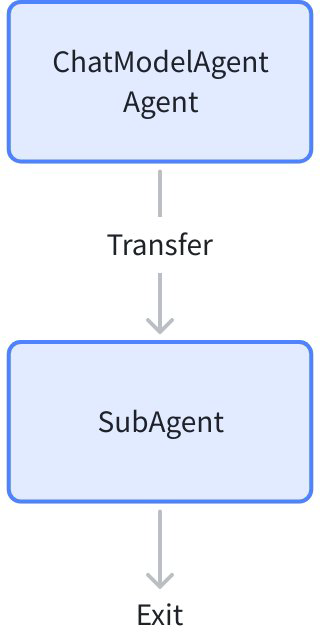
Transfer corresponds to the [Transfer Collaboration Mode]. When an Agent produces an AgentEvent containing a TransferAction during runtime, Eino ADK calls the Agent specified by the Action. The called Agent is called a sub-Agent (SubAgent).
TransferAction can be quickly created using NewTransferToAgentAction:
import "github.com/cloudwego/eino/adk"

event := adk.NewTransferToAgentAction("dest agent name")
To allow Eino ADK to find and run the sub-Agent instance when receiving a TransferAction, you need to call SetSubAgents to register possible sub-Agents with Eino ADK before running:
// github.com/cloudwego/eino/adk/flow.go
func SetSubAgents(ctx context.Context, agent Agent, subAgents []Agent) (Agent, error)
💡 The meaning of Transfer is to hand off the task to the sub-Agent, not delegate or assign, therefore:
- Unlike ToolCall, when calling a sub-Agent through Transfer, the parent Agent will not summarize content or perform the next operation after the sub-Agent finishes running.
- When calling a sub-Agent, the sub-Agent’s input is still the original input, and the parent Agent’s output serves as context for the sub-Agent’s reference.
When triggering SetSubAgents, both parent and child Agents need to be processed to complete initialization. Eino ADK defines the OnSubAgents interface to support this functionality:
// github.com/cloudwego/eino/adk/interface.go
type OnSubAgents interface {
    OnSetSubAgents(ctx context.Context, subAgents []Agent) error
    OnSetAsSubAgent(ctx context.Context, parent Agent) error
    OnDisallowTransferToParent(ctx context.Context) error
}
If an Agent implements the OnSubAgents interface, SetSubAgents will call the corresponding methods to register with the Agent, such as the ChatModelAgent implementation.
Example
Next, we demonstrate the Transfer capability with a multi-functional dialogue Agent. The goal is to build an Agent that can query weather or chat with users. The Agent structure is as follows:
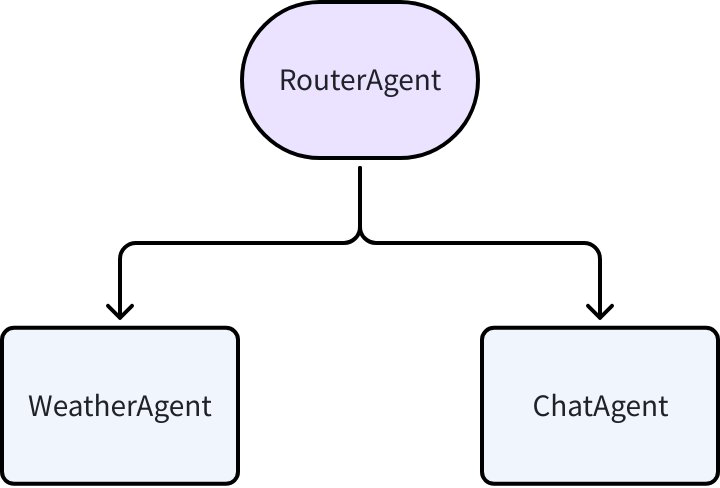
All three Agents are implemented using ChatModelAgent:
import (
    "context"
    "fmt"
    "log"
    "os"

    "github.com/cloudwego/eino-ext/components/model/openai"
    "github.com/cloudwego/eino/adk"
    "github.com/cloudwego/eino/components/model"
    "github.com/cloudwego/eino/components/tool"
    "github.com/cloudwego/eino/components/tool/utils"
    "github.com/cloudwego/eino/compose"
)

func newChatModel() model.ToolCallingChatModel {
    cm, err := openai.NewChatModel(context.Background(), &openai.ChatModelConfig{
       APIKey: os.Getenv("OPENAI_API_KEY"),
       Model:  os.Getenv("OPENAI_MODEL"),
    })
    if err != nil {
       log.Fatal(err)
    }
    return cm
}

type GetWeatherInput struct {
    City string `json:"city"`
}

func NewWeatherAgent() adk.Agent {
    weatherTool, err := utils.InferTool(
       "get_weather",
       "Gets the current weather for a specific city.",
       func(ctx context.Context, input *GetWeatherInput) (string, error) {
          return fmt.Sprintf(`the temperature in %s is 25°C`, input.City), nil
       },
    )
    if err != nil {
       log.Fatal(err)
    }

    a, err := adk.NewChatModelAgent(context.Background(), &adk.ChatModelAgentConfig{
       Name:        "WeatherAgent",
       Description: "This agent can get the current weather for a given city.",
       Instruction: "Your sole purpose is to get the current weather for a given city by using the 'get_weather' tool. After calling the tool, report the result directly to the user.",
       Model:       newChatModel(),
       ToolsConfig: adk.ToolsConfig{
          ToolsNodeConfig: compose.ToolsNodeConfig{
             Tools: []tool.BaseTool{weatherTool},
          },
       },
    })
    if err != nil {
       log.Fatal(err)
    }
    return a
}

func NewChatAgent() adk.Agent {
    a, err := adk.NewChatModelAgent(context.Background(), &adk.ChatModelAgentConfig{
       Name:        "ChatAgent",
       Description: "A general-purpose agent for handling conversational chat.",
       Instruction: "You are a friendly conversational assistant. Your role is to handle general chit-chat and answer questions that are not related to any specific tool-based tasks.",
       Model:       newChatModel(),
    })
    if err != nil {
       log.Fatal(err)
    }
    return a
}

func NewRouterAgent() adk.Agent {
    a, err := adk.NewChatModelAgent(context.Background(), &adk.ChatModelAgentConfig{
       Name:        "RouterAgent",
       Description: "A manual router that transfers tasks to other expert agents.",
       Instruction: `You are an intelligent task router. Your responsibility is to analyze the user's request and delegate it to the most appropriate expert agent.If no Agent can handle the task, simply inform the user it cannot be processed.`,
       Model:       newChatModel(),
    })
    if err != nil {
       log.Fatal(err)
    }
    return a
}
Then use Eino ADK’s Transfer capability to build Multi-Agent and run. ChatModelAgent implements the OnSubAgent interface, and in the adk.SetSubAgents method, this interface is used to register parent/child Agents with ChatModelAgent, without requiring users to handle TransferAction generation:
import (
    "context"
    "fmt"
    "log"
    "os"

    "github.com/cloudwego/eino/adk"
)

func main() {
    weatherAgent := NewWeatherAgent()
    chatAgent := NewChatAgent()
    routerAgent := NewRouterAgent()

    ctx := context.Background()
    a, err := adk.SetSubAgents(ctx, routerAgent, []adk.Agent{chatAgent, weatherAgent})
    if err != nil {
       log.Fatal(err)
    }

    runner := adk.NewRunner(ctx, adk.RunnerConfig{
       Agent: a,
    })

    // query weather
    println("\n\n>>>>>>>>>query weather<<<<<<<<<")
    iter := runner.Query(ctx, "What's the weather in Beijing?")
    for {
       event, ok := iter.Next()
       if !ok {
          break
       }
       if event.Err != nil {
          log.Fatal(event.Err)
       }
       if event.Action != nil {
          fmt.Printf("\nAgent[%s]: transfer to %+v\n\n======\n", event.AgentName, event.Action.TransferToAgent.DestAgentName)
       } else {
          fmt.Printf("\nAgent[%s]:\n%+v\n\n======\n", event.AgentName, event.Output.MessageOutput.Message)
       }
    }

    // failed to route
    println("\n\n>>>>>>>>>failed to route<<<<<<<<<")
    iter = runner.Query(ctx, "Book me a flight from New York to London tomorrow.")
    for {
       event, ok := iter.Next()
       if !ok {
          break
       }
       if event.Err != nil {
          log.Fatal(event.Err)
       }
       if event.Action != nil {
          fmt.Printf("\nAgent[%s]: transfer to %+v\n\n======\n", event.AgentName, event.Action.TransferToAgent.DestAgentName)
       } else {
          fmt.Printf("\nAgent[%s]:\n%+v\n\n======\n", event.AgentName, event.Output.MessageOutput.Message)
       }
    }
}
Running result:
>>>>>>>>>query weather<<<<<<<<<
Agent[RouterAgent]:
assistant:
tool_calls:
{Index:<nil> ID:call_SKNsPwKCTdp1oHxSlAFt8sO6 Type:function Function:{Name:transfer_to_agent Arguments:{"agent_name":"WeatherAgent"}} Extra:map[]}

finish_reason: tool_calls
usage: &{201 17 218}
======
Agent[RouterAgent]: transfer to WeatherAgent
======
Agent[WeatherAgent]:
assistant:
tool_calls:
{Index:<nil> ID:call_QMBdUwKj84hKDAwMMX1gOiES Type:function Function:{Name:get_weather Arguments:{"city":"Beijing"}} Extra:map[]}

finish_reason: tool_calls
usage: &{255 15 270}
======
Agent[WeatherAgent]:
tool: the temperature in Beijing is 25°C
tool_call_id: call_QMBdUwKj84hKDAwMMX1gOiES
tool_call_name: get_weather
======
Agent[WeatherAgent]:
assistant: The current temperature in Beijing is 25°C.
finish_reason: stop
usage: &{286 11 297}
======

>>>>>>>>>failed to route<<<<<<<<<
Agent[RouterAgent]:
assistant: I'm unable to assist with booking flights. Please use a relevant travel service or booking platform to make your reservation.
finish_reason: stop
usage: &{206 23 229}
======
The other two methods of OnSubAgents are called when an Agent is used as a sub-Agent in SetSubAgents:
- OnSetAsSubAgent is used to register parent Agent information with the Agent
- OnDisallowTransferToParent is called when the Agent is set with WithDisallowTransferToParent option, used to inform the Agent not to produce TransferAction to the parent Agent.
adk.SetSubAgents(
    ctx,
    Agent1,
    []adk.Agent{
       adk.AgentWithOptions(ctx, Agent2, adk.WithDisallowTransferToParent()),
    },
)
Static Configuration Transfer
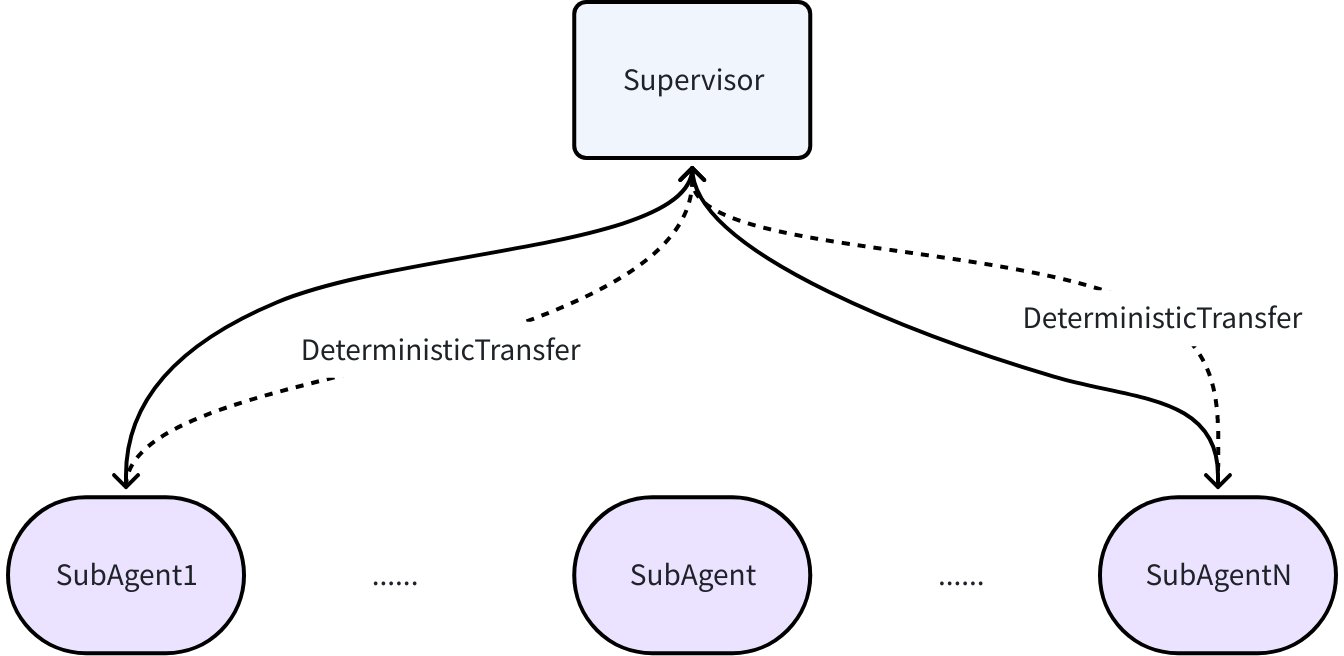
AgentWithDeterministicTransferTo is an Agent Wrapper that generates preset TransferAction after the original Agent executes, enabling static configuration of Agent jumping:
// github.com/cloudwego/eino/adk/flow.go

type DeterministicTransferConfig struct {
        Agent        Agent
        ToAgentNames []string
}

func AgentWithDeterministicTransferTo(_ context.Context, config *DeterministicTransferConfig) Agent
In Supervisor mode, after a sub-Agent finishes execution, it returns to the Supervisor, and the Supervisor generates the next task target. In this case, AgentWithDeterministicTransferTo can be used:
// github.com/cloudwego/eino/adk/prebuilt/supervisor.go

type SupervisorConfig struct {
        Supervisor adk.Agent
        SubAgents  []adk.Agent
}

func NewSupervisor(ctx context.Context, conf *SupervisorConfig) (adk.Agent, error) {
        subAgents := make([]adk.Agent, 0, len(conf.SubAgents))
        supervisorName := conf.Supervisor.Name(ctx)
        for _, subAgent := range conf.SubAgents {
                subAgents = append(subAgents, adk.AgentWithDeterministicTransferTo(ctx, &adk.DeterministicTransferConfig{
                        Agent:        subAgent,
                        ToAgentNames: []string{supervisorName},
                }))
        }

        return adk.SetSubAgents(ctx, conf.Supervisor, subAgents)
}
Workflow Agents
WorkflowAgent supports running Agents according to a preset flow in code. Eino ADK provides three basic Workflow Agents: Sequential, Parallel, and Loop. They can be nested with each other to complete more complex tasks.
By default, each Agent’s input in a Workflow is generated using the method described in the History section. You can customize AgentInput generation using WithHistoryRewriter.
When an Agent produces an ExitAction Event, the Workflow Agent will exit immediately, regardless of whether there are other Agents that need to run afterward.
For details and usage examples, see: Eino ADK: Workflow Agents
SequentialAgent
SequentialAgent executes a series of Agents in the order you provide:
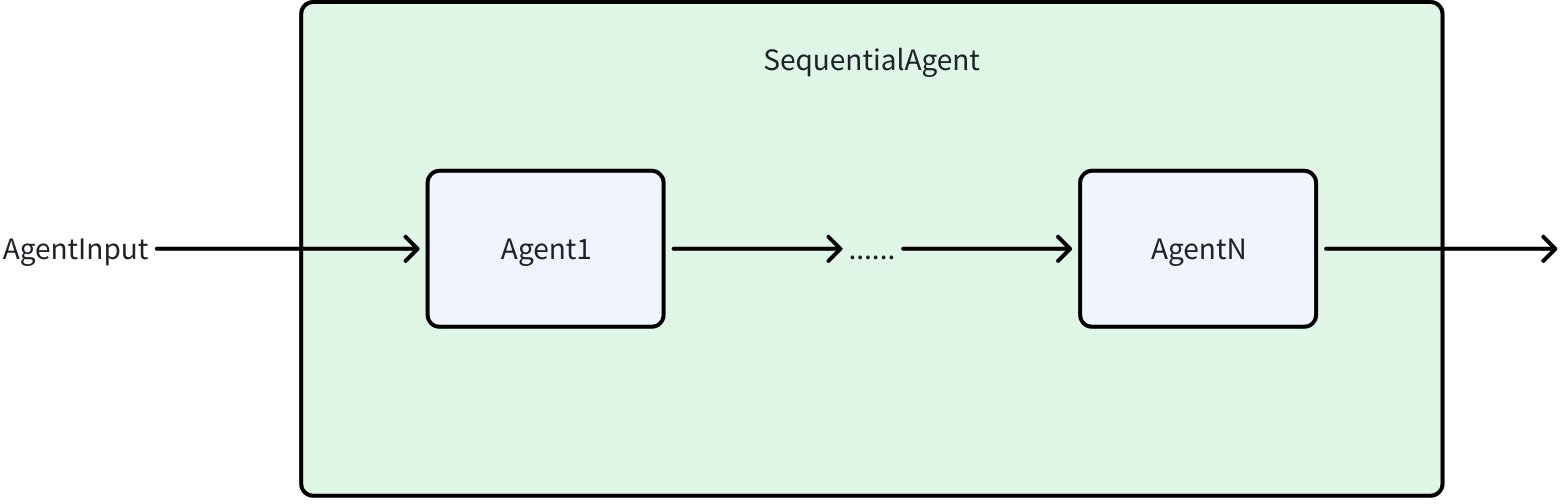
type SequentialAgentConfig struct {
    Name        string
    Description string
    SubAgents   []Agent
}

func NewSequentialAgent(ctx context.Context, config *SequentialAgentConfig) (Agent, error)
LoopAgent
LoopAgent is implemented based on SequentialAgent. After SequentialAgent completes running, it starts from the beginning again:
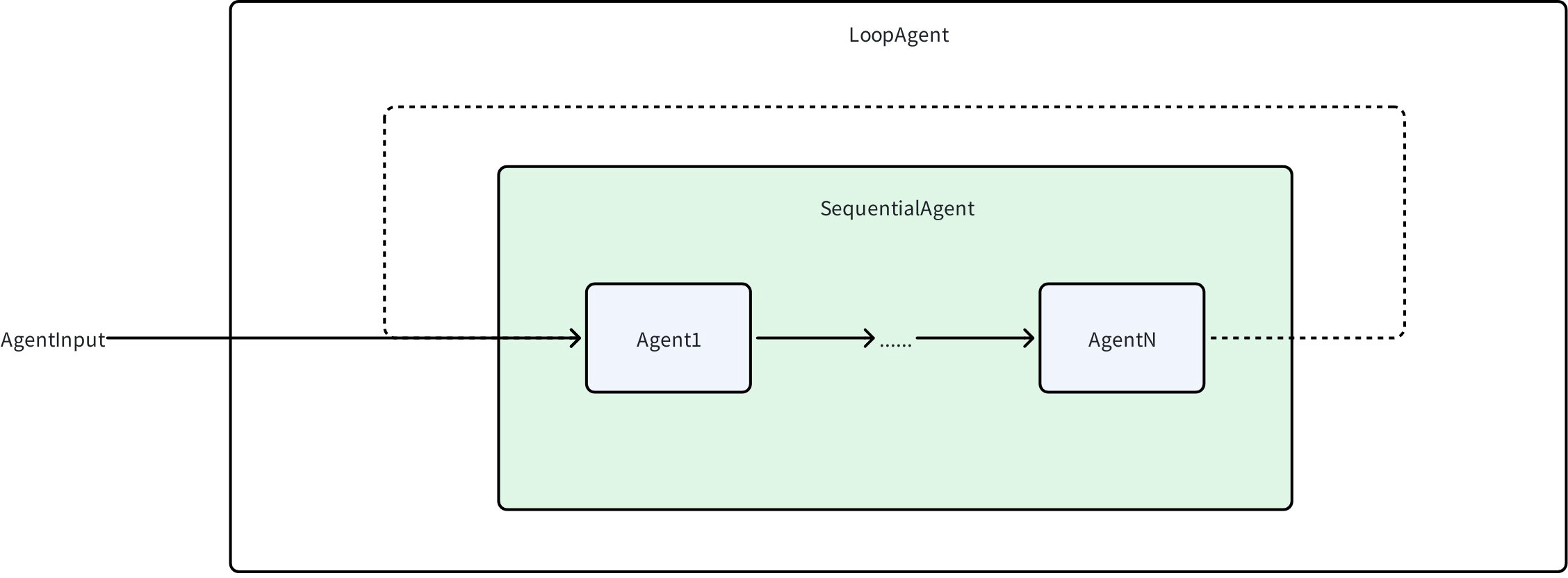
type LoopAgentConfig struct {
    Name        string
    Description string
    SubAgents   []Agent

    MaxIterations int // Maximum number of iterations
}

func NewLoopAgent(ctx context.Context, config *LoopAgentConfig) (Agent, error)
ParallelAgent
ParallelAgent runs multiple Agents concurrently:
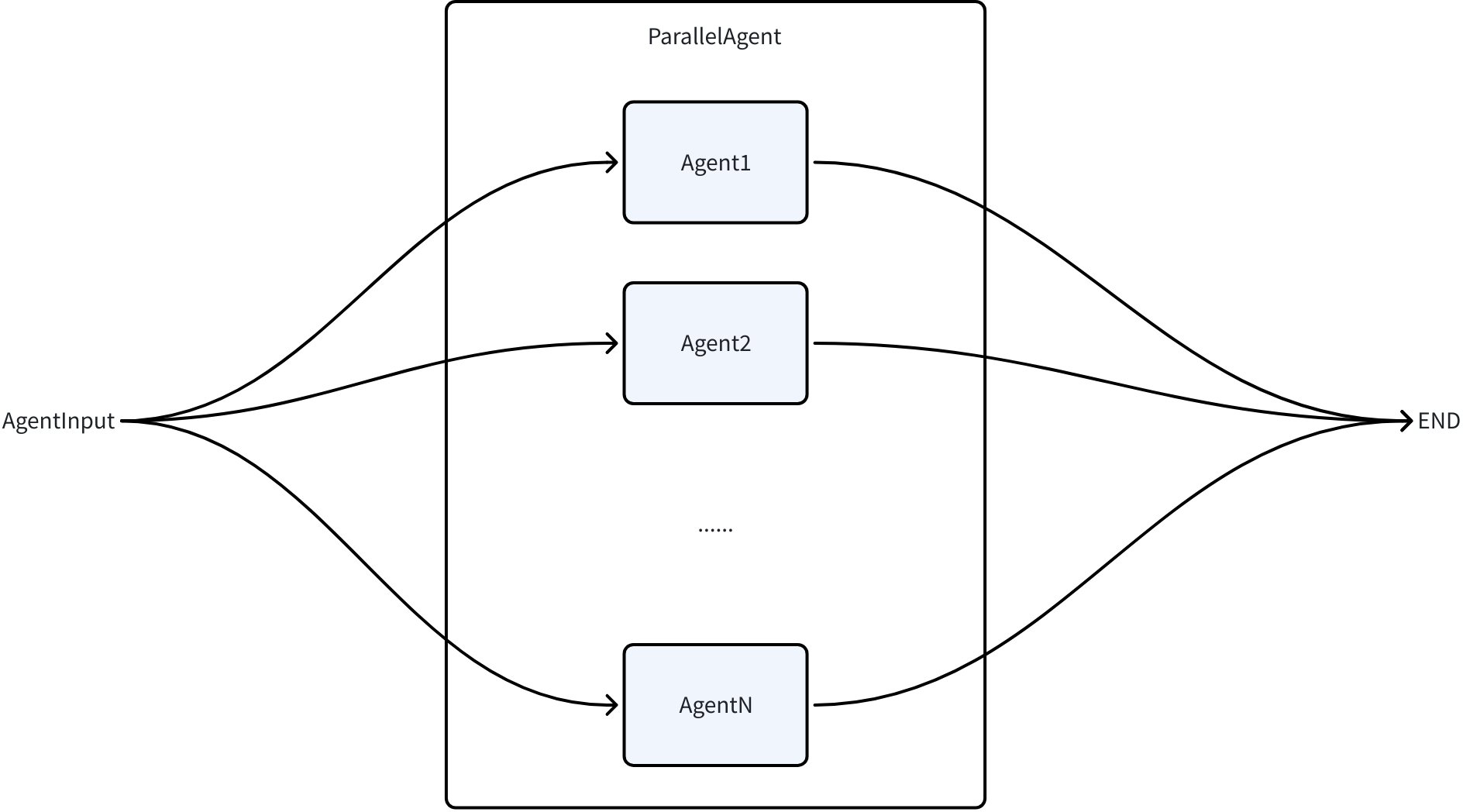
type ParallelAgentConfig struct {
    Name        string
    Description string
    SubAgents   []Agent
}

func NewParallelAgent(ctx context.Context, config *ParallelAgentConfig) (Agent, error)
AgentAsTool
When an Agent only needs clear and explicit instructions rather than complete running context (History), the Agent can be converted to a Tool for calling:
func NewAgentTool(_ context.Context, agent Agent, options ...AgentToolOption) tool.BaseTool
After being converted to a Tool, the Agent can be called by ChatModels that support function calling, and can also be called by all LLM-driven Agents. The calling method depends on the Agent implementation.
Message History Isolation: An Agent as a Tool will not inherit the message history (History) of the parent Agent.
SessionValues Sharing: However, it will share the SessionValues of the parent Agent, i.e., read and write the same KV map.
Internal Event Exposure: An Agent as a Tool is still an Agent and will produce AgentEvents. By default, these internal AgentEvents will not be exposed through the AsyncIterator returned by Runner. In some business scenarios, if you need to expose internal AgentTool’s AgentEvents to users, you need to add configuration in the parent ChatModelAgent’s ToolsConfig to enable internal event exposure:
// from adk/chatmodel.go

**type **ToolsConfig **struct **{
    // other configurations...

    _// EmitInternalEvents indicates whether internal events from agentTool should be emitted_
_    // to the parent generator via a tool option injection at run-time._
_    _EmitInternalEvents bool
}