Eino ADK: Agent Interface
Agent Definition
Eino defines a basic interface for Agents. Any struct implementing this interface can be considered an Agent:
// github.com/cloudwego/eino/adk/interface.go

type Agent interface {
    Name(ctx context.Context) string
    Description(ctx context.Context) string
    Run(ctx context.Context, input *AgentInput, opts ...AgentRunOption) *AsyncIterator[*AgentEvent]
}
| Method | Description |
| Name | The name of the Agent, serving as its identifier |
| Description | Description of the Agent's capabilities, mainly used to help other Agents understand and determine this Agent's responsibilities or functions |
| Run | The core execution method of the Agent, returns an iterator through which the caller can continuously receive events produced by the Agent |
AgentInput
The Run method accepts AgentInput as the Agent’s input:
type AgentInput struct {
    Messages        []Message
    EnableStreaming bool
}

type Message = *schema.Message
Agents typically center around a ChatModel, so the Agent’s input is defined as Messages, which is the same type used when calling Eino ChatModel. Messages can include user instructions, dialogue history, background knowledge, example data, and any other data you wish to pass to the Agent. For example:
import (
    "github.com/cloudwego/eino/adk"
    "github.com/cloudwego/eino/schema"
)

input := &adk.AgentInput{
    Messages: []adk.Message{
       schema.UserMessage("What's the capital of France?"),
       schema.AssistantMessage("The capital of France is Paris.", nil),
       schema.UserMessage("How far is it from London? "),
    },
}
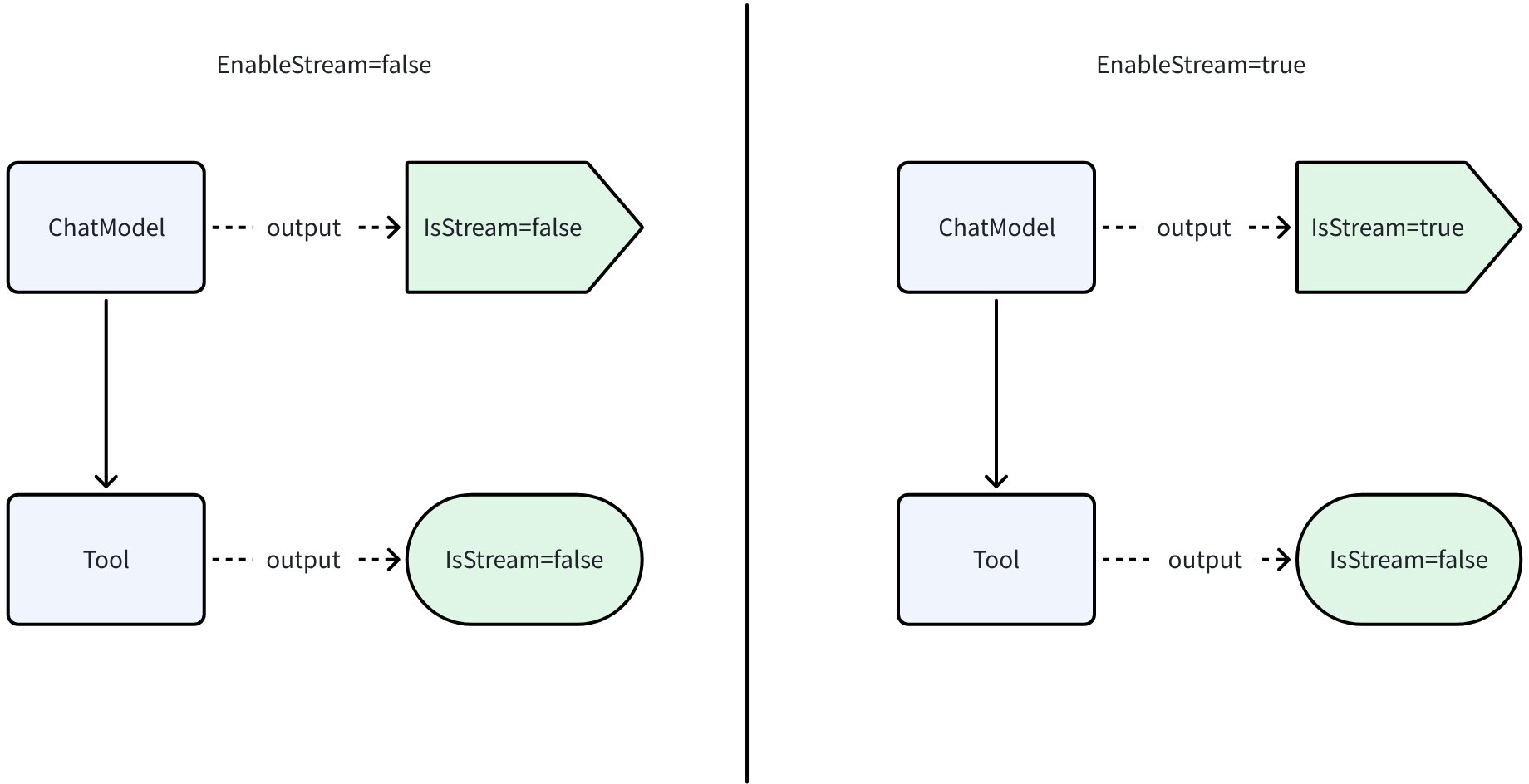
EnableStreaming is used to suggest the output mode to the Agent, but it is not a mandatory constraint. Its core idea is to control the behavior of components that support both streaming and non-streaming output, such as ChatModel, while components that only support one output method will not be affected by EnableStreaming. Additionally, the AgentOutput.IsStreaming field indicates the actual output type. The runtime behavior is:
- When
EnableStreaming=false, for components that can output both streaming and non-streaming, the non-streaming mode that returns the complete result at once will be used. - When
EnableStreaming=true, for components inside the Agent that can output streaming (such as ChatModel calls), results should be returned incrementally as a stream. If a component does not naturally support streaming, it can still work in its original non-streaming manner.
As shown in the diagram below, ChatModel can output either streaming or non-streaming, while Tool can only output non-streaming:
- When
EnableStream=false, both output non-streaming - When
EnableStream=true, ChatModel outputs streaming, while Tool still outputs non-streaming since it doesn’t have streaming capability.
AgentRunOption
AgentRunOption is defined by the Agent implementation and can modify Agent configuration or control Agent behavior at the request level.
Eino ADK provides some commonly defined Options for users:
WithSessionValues: Set cross-Agent read/write dataWithSkipTransferMessages: When configured, when the Event is Transfer SubAgent, the messages in the Event will not be appended to History
Eino ADK provides two methods WrapImplSpecificOptFn and GetImplSpecificOptions for Agents to wrap and read custom AgentRunOption.
When using the GetImplSpecificOptions method to read AgentRunOptions, AgentRunOptions that don’t match the required type (like options in the example) will be ignored.
For example, you can define WithModelName to require the Agent to change the model being called at the request level:
// github.com/cloudwego/eino/adk/call_option.go
// func WrapImplSpecificOptFn[T any](optFn func(*T)) AgentRunOption
// func GetImplSpecificOptions[T any](base *T, opts ...AgentRunOption) *T

import "github.com/cloudwego/eino/adk"

type options struct {
    modelName string
}

func WithModelName(name string) adk.AgentRunOption {
    return adk.WrapImplSpecificOptFn(func(t *options) {
       t.modelName = name
    })
}

func (m *MyAgent) Run(ctx context.Context, input *adk.AgentInput, opts ...adk.AgentRunOption) *adk.AsyncIterator[*adk.AgentEvent] {
    o := &options{}
    o = adk.GetImplSpecificOptions(o, opts...)
    // run code...
}
Additionally, AgentRunOption has a DesignateAgent method. Calling this method allows you to specify which Agents the Option takes effect on when calling a multi-Agent system:
func genOpt() {
    // Specify that the option only takes effect for agent_1 and agent_2
    opt := adk.WithSessionValues(map[string]any{}).DesignateAgent("agent_1", "agent_2")
}
AsyncIterator
Agent.Run returns an iterator AsyncIterator[*AgentEvent]:
// github.com/cloudwego/eino/adk/utils.go

type AsyncIterator[T any] struct {
    ...
}

func (ai *AsyncIterator[T]) Next() (T, bool) {
    ...
}
It represents an asynchronous iterator (asynchronous means there is no synchronization control between production and consumption), allowing the caller to consume a series of events produced by the Agent during execution in an ordered, blocking manner.
AsyncIteratoris a generic struct that can be used to iterate over any type of data. Currently in the Agent interface, the iterator type returned by the Run method is fixed asAsyncIterator[*AgentEvent]. This means that every element you get from this iterator will be a pointer to anAgentEventobject.AgentEventwill be explained in detail in the following sections.- The main way to interact with the iterator is by calling its
Next()method. This method’s behavior is blocking. Each time you callNext(), the program pauses execution until one of the following two situations occurs:- The Agent produces a new
AgentEvent: TheNext()method returns this event, and the caller can process it immediately. - The Agent actively closes the iterator: When the Agent will no longer produce any new events (usually when the Agent finishes running), it closes this iterator. At this point, the
Next()call ends blocking and returns false in the second return value, informing the caller that iteration has ended.
- The Agent produces a new
Typically, you need to use a for loop to process AsyncIterator:
iter := myAgent.Run(xxx) // get AsyncIterator from Agent.Run

for {
    event, ok := iter.Next()
    if !ok {
        break
    }
    // handle event
}
AsyncIterator can be created by NewAsyncIteratorPair. The other parameter returned by this function, AsyncGenerator, is used to produce data:
// github.com/cloudwego/eino/adk/utils.go

func NewAsyncIteratorPair[T any]() (*AsyncIterator[T], *AsyncGenerator[T])
Agent.Run returns AsyncIterator to allow the caller to receive a series of AgentEvents produced by the Agent in real-time. Therefore, Agent.Run usually runs the Agent in a Goroutine to immediately return the AsyncIterator for the caller to listen to:
import "github.com/cloudwego/eino/adk"

func (m *MyAgent) Run(ctx context.Context, input *adk.AgentInput, opts ...adk.AgentRunOption) *adk.AsyncIterator[*adk.AgentEvent] {
    // handle input
    iter, gen := adk.NewAsyncIteratorPair[*adk.AgentEvent]()
    go func() {
       defer func() {
          // recover code
          gen.Close()
       }()
       // agent run code
       // gen.Send(event)
    }()
    return iter
}
AgentWithOptions
Using the AgentWithOptions method allows you to perform some common configurations in Eino ADK Agent.
Unlike AgentRunOption, AgentWithOptions takes effect before running and does not support custom options.
// github.com/cloudwego/eino/adk/flow.go
func AgentWithOptions(ctx context.Context, agent Agent, opts ...AgentOption) Agent
Currently built-in configurations supported by Eino ADK:
WithDisallowTransferToParent: Configure that this SubAgent is not allowed to Transfer to ParentAgent, which will trigger the SubAgent’sOnDisallowTransferToParentcallback methodWithHistoryRewriter: When configured, this Agent will rewrite the received context information through this method before execution
AgentEvent
AgentEvent is the core event data structure produced by the Agent during its execution. It contains the Agent’s meta information, output, behavior, and errors:
// github.com/cloudwego/eino/adk/interface.go

type AgentEvent struct {
    AgentName string

    RunPath []RunStep

    Output *AgentOutput

    Action *AgentAction

    Err error
}

// EventFromMessage builds a standard event
func EventFromMessage(msg Message, msgStream MessageStream, role schema.RoleType, toolName string) *AgentEvent
AgentName & RunPath
The AgentName and RunPath fields are automatically filled by the framework. They provide important context information about the event source, which is crucial in complex systems composed of multiple Agents.
type RunStep struct {
    agentName string
}
AgentNameindicates which Agent instance produced the current AgentEvent.RunPathrecords the complete call chain to reach the current Agent.RunPathis a slice ofRunStepthat records allAgentNames in order from the initial entry Agent to the Agent that produced the current event.
AgentOutput
AgentOutput encapsulates the output produced by the Agent.
Message output is set in the MessageOutput field, while other types of custom output are set in the CustomizedOutput field:
// github.com/cloudwego/eino/adk/interface.go

type AgentOutput struct {
    MessageOutput *MessageVariant

    CustomizedOutput any
}

type MessageVariant struct {
    IsStreaming bool

    Message       Message
    MessageStream MessageStream
    // message role: Assistant or Tool
    Role schema.RoleType
    // only used when Role is Tool
    ToolName string
}
The type MessageVariant of the MessageOutput field is a core data structure with the main functions of:
-
Unified handling of streaming and non-streaming messages:
IsStreamingis a flag. A value of true indicates that the currentMessageVariantcontains a streaming message (read from MessageStream), while false indicates it contains a non-streaming message (read from Message):- Streaming: Returns a series of message fragments over time that eventually form a complete message (MessageStream).
- Non-streaming: Returns a complete message at once (Message).
-
Providing convenient metadata access: The Message struct contains some important meta information internally, such as the message’s Role (Assistant or Tool). To quickly identify message types and sources, MessageVariant elevates these commonly used metadata to the top level:
Role: The role of the message, Assistant / ToolToolName: If the message role is Tool, this field directly provides the tool’s name.
The benefit of this is that when code needs to route or make decisions based on message type, it doesn’t need to deeply parse the specific content of the Message object. It can directly get the required information from the top-level fields of MessageVariant, thus simplifying the logic and improving code readability and efficiency.
AgentAction
An Agent producing an Event containing AgentAction can control multi-Agent collaboration, such as immediate exit, interruption, transfer, etc.:
// github.com/cloudwego/eino/adk/interface.go

type AgentAction struct {
    Exit bool

    Interrupted *InterruptInfo

    TransferToAgent *TransferToAgentAction

    BreakLoop *BreakLoopAction

    CustomizedAction any
}

type InterruptInfo struct {
    Data any
}

type TransferToAgentAction struct {
    DestAgentName string
}
Eino ADK currently has four preset Actions:
- Exit: When an Agent produces an Exit Action, the Multi-Agent will exit immediately
func NewExitAction() *AgentAction {
    return &AgentAction{Exit: true}
}
- Transfer: When an Agent produces a Transfer Action, it will transfer to the target Agent to run
func NewTransferToAgentAction(destAgentName string) *AgentAction {
    return &AgentAction{TransferToAgent: &TransferToAgentAction{DestAgentName: destAgentName}}
}
- Interrupt: When an Agent produces an Interrupt Action, it will interrupt the Runner’s execution. Since interruption can occur at any position and unique information needs to be passed out during interruption, the Action provides an
Interruptedfield for the Agent to set custom data. When the Runner receives an Action with non-empty Interrupted, it considers an interruption has occurred. The internal mechanism of Interrupt & Resume is relatively complex and will be detailed in the [Eino ADK: Agent Runner] - [Eino ADK: Interrupt & Resume] section.
// For example, when ChatModelAgent interrupts, it sends the following AgentEvent:
h.Send(&AgentEvent{AgentName: h.agentName, Action: &AgentAction{
    Interrupted: &InterruptInfo{
       Data: &ChatModelAgentInterruptInfo{Data: data, Info: info},
    },
}})
- Break Loop: When a sub-Agent of LoopAgent emits a BreakLoopAction, the corresponding LoopAgent will stop looping and exit normally.